
Documentation - Module selection
How to choose a Jetson module
for the CB302B.
The CB302B is a Jetson Orin carrier board that takes four modules: Jetson Orin Nano 4GB, Jetson Orin Nano 8GB, Orin NX 8GB and Orin NX 16GB. Nothing else fits, and the module is not included with the board. This page is about picking the right one.
02 - The four options
Start with memory and workload.
| Module | Memory | What it is for |
|---|---|---|
| Orin Nano 4GB | 4 GB | Smaller applications and light inference. Check memory headroom for the operating system and background services. |
| Orin Nano 8GB | 8 GB | Applications that need more than 4 GB. Profile the complete workload before deciding that 8 GB is enough. |
| Orin NX 8GB | 8 GB | Compute-bound workloads with tighter throughput or latency targets. Compare under the intended software and power mode. |
| Orin NX 16GB | 16 GB | Larger models and memory-intensive applications that exceed an 8 GB budget, including operating-system overhead. |
Memory capacity alone does not determine performance or battery runtime. Test your intended workload and power mode.
Video encode and decode
Does the Jetson Orin Nano have a hardware encoder?
No. NVIDIA states that the Jetson Orin Nano does not have the NVENC engine, in its Software Encode in Orin Nano note. Decode is different. NVIDIA's tech specs list H.265 video decode for both Orin Nano modules, and the transcode example in that same note uses NVIDIA-accelerated decode. The Orin NX 8GB and Orin NX 16GB have hardware for both: the Orin NX data sheet lists NVENC for encode and NVDEC for decode.
Video encode and decode hardware is part of the Jetson module, so if your application records or streams video, check the encoder as well as memory. The figures below are NVIDIA's published module figures, each linked to the NVIDIA page it comes from. They are not CB302B measurements.
| Module | Hardware encoder | Video encode | Video decode (H.265) |
|---|---|---|---|
| Orin Nano 4GB | No NVENC | 1080p30 supported by 1-2 CPU cores | 1x 4K60 · 2x 4K30 · 5x 1080p60 · 11x 1080p30 |
| Orin Nano 8GB | No NVENC | 1080p30 supported by 1-2 CPU cores | 1x 4K60 · 2x 4K30 · 5x 1080p60 · 11x 1080p30 |
| Orin NX 8GB | NVENC | 1x 4K60 · 3x 4K30 · 6x 1080p60 · 12x 1080p30 (H.265) | 1x 8K30 · 2x 4K60 · 4x 4K30 · 9x 1080p60 · 18x 1080p30 |
| Orin NX 16GB | NVENC | 1x 4K60 · 3x 4K30 · 6x 1080p60 · 12x 1080p30 (H.265) | 1x 8K30 · 2x 4K60 · 4x 4K30 · 9x 1080p60 · 18x 1080p30 |
Encode and decode figures: NVIDIA Jetson Orin technical specifications. For Orin NX, the Orin NX data sheet gives these as the maximum number of streams at each resolution, so read each list as options, not a total.
The decode column uses H.265, the codec NVIDIA's tech specs table gives for all four modules. The same table gives H.265 for Orin NX encode but names no codec for Orin Nano encode, and NVIDIA's Software Encode in Orin Nano note covers H.264 only. The Orin NX data sheet (Table 2-8) also lists H.264 and AV1 hardware encode for Orin NX. For H.264, its UHP row gives up to 1x 4K60, 2x 4K30, 5x 1080p60 or 11x 1080p30.
Orin NX: hardware encode in GStreamer
NVIDIA's L4T r36.5 developer guide lists three video encoder elements for GStreamer: nvv4l2h264enc, nvv4l2h265enc and nvv4l2av1enc. It labels their examples NVIDIA Accelerated Encode. Of the four modules above, the Orin NX 8GB and Orin NX 16GB are the ones with NVENC. This is NVIDIA's documented H.264 constant bitrate example from the encoder features section. Its source is GStreamer's videotestsrc test pattern.
NVIDIA's documented pipeline · Orin NX
$ gst-launch-1.0 videotestsrc num-buffers=300 ! \
     'video/x-raw, width=(int)1280, height=(int)720, \
     format=(string)I420, framerate=(fraction)30/1' ! nvvidconv ! \
     'video/x-raw(memory:NVMM), format=(string)NV12' ! nvv4l2h264enc \
     control-rate=1 bitrate=30000000 ! h264parse ! qtmux ! filesink \
     location=<filename_h264_CBR.mp4> -e
Orin Nano: software encode
With no NVENC, NVIDIA's route on Orin Nano is software encoding. Its Software Encode in Orin Nano note covers libx264 through libav (FFmpeg) and the x264enc GStreamer element, and shows H.264 only. Decode stays in hardware: in NVIDIA's transcode example, nvv4l2decoder decodes and x264enc encodes on the CPU.
NVIDIA's documented pipeline · Orin Nano
$ gst-launch-1.0 filesrc location=<filename_1080p.mp4> ! qtdemux ! \
   h264parse ! nvv4l2decoder ! \
   'video/x-raw(memory:NVMM), format=NV12' ! \
   nvvidconv ! video/x-raw, format=I420 ! x264enc ! \
   h264parse ! filesink location=<Transcoded_filename.h264> -e
Both pipelines are copied verbatim from NVIDIA's L4T r36.5 documentation. They are NVIDIA's examples, not CB302B test results. Replace the placeholders in angle brackets with your own file names.
03 - Start with memory
A model that does not fit does not run.
Start with the memory needed by your application, model and operating system. Then check whether the module meets your throughput and latency targets with that workload.
If you know the model you intend to deploy, size to that and leave headroom for the rest of the system. If you do not know yet, the Orin Nano 8GB is one starting point to evaluate. Its additional memory leaves more headroom than the 4GB option.
Consider 16 GB if the full application approaches the 8 GB limit or you expect its memory needs to grow. Do not infer a fixed power or runtime penalty from memory capacity alone.
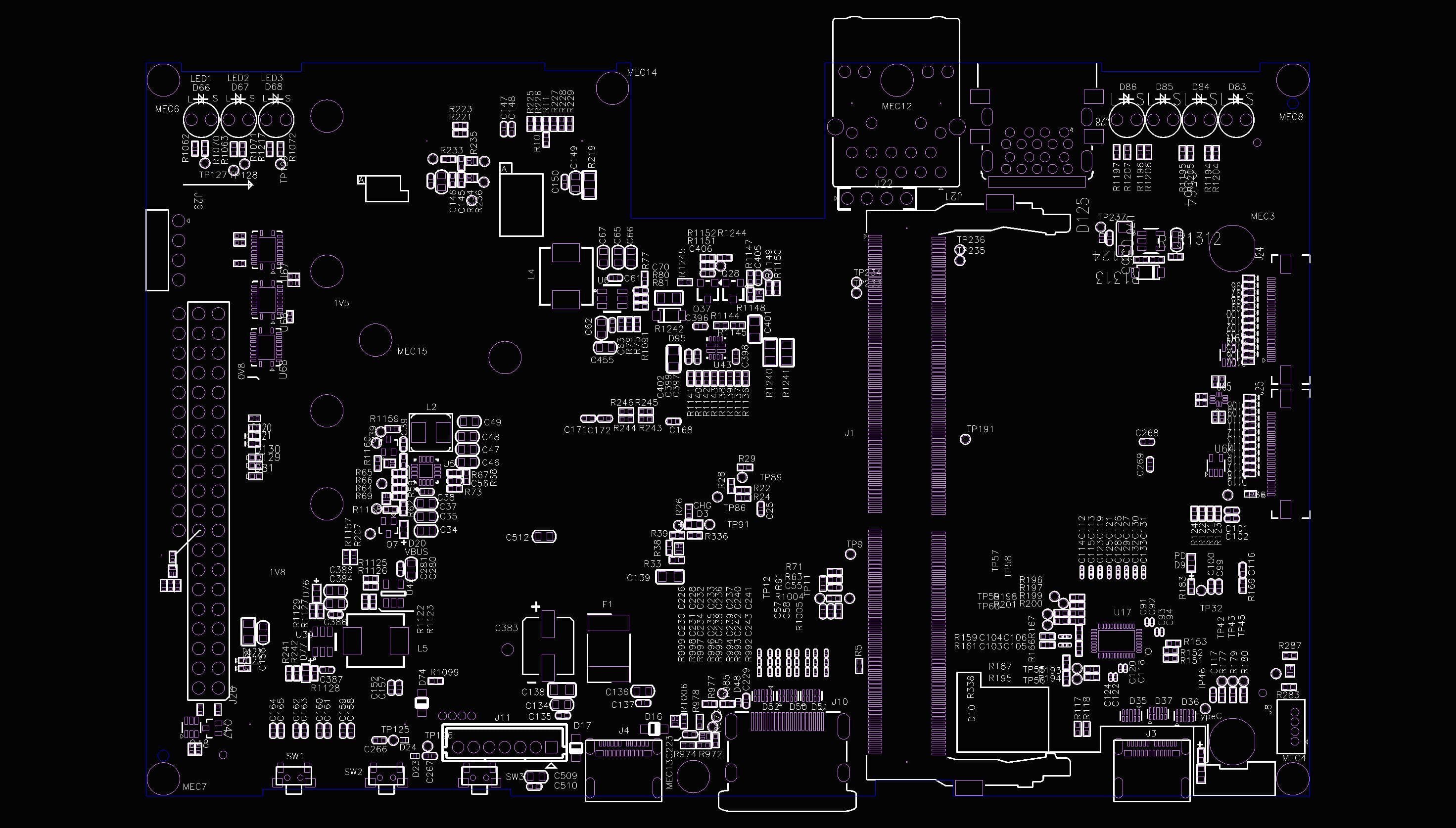
CB302B · Top view
04 - Then power
Plan runtime around the complete build.
Battery runtime depends on the module, configured power mode, workload, peripherals and battery pack. A module's power-mode rating does not measure the draw of a complete CB302B system.
The board's input ratings are 45 W over USB-C Power Delivery and up to 60 W through the battery connector. These are supply limits, not typical consumption figures. Budget for the whole system, including cooling, storage and attached devices.
For planning, runtime in hours is approximately usable battery energy in watt-hours divided by average whole-system power in watts, measured at the battery input. Use compatible measured inputs and account for pack condition and operating conditions. Contact us for guidance on your module, workload and pack; published pack-specific runtime measurements are not yet available.
05 - If you want a straight answer
Pick this one.
Orin Nano 4GB
Consider it when the complete workload fits comfortably in 4 GB.
Orin Nano 8GB
More memory headroom than the Nano 4GB for prototyping.
Orin NX 8GB
Evaluate it when an 8 GB workload needs more compute than the Nano provides.
Orin NX 16GB
The 16 GB option when your application needs more memory headroom.
If you are still unsure, evaluate the Orin Nano 8GB against your expected workload. You can move to another supported Orin module without changing the carrier board, then reassess power and cooling.
06 - Same on all four
The board does not change.
Whichever module you fit, the CB302B gives you the same interfaces. The 40-pin GPIO header and 22-pin camera connectors use the same formats found on the NVIDIA Jetson Orin Nano Developer Kit.
07 - One board, both families
Is the CB302B an Orin Nano board or an Orin NX board?
Both. The CB302B is a Jetson Orin NX carrier board and a Jetson Orin Nano carrier board in the same design. The two module families share a connector and a footprint, so one board takes either, and swapping between them does not mean swapping hardware around it.
That matters if you are prototyping. Start on an Orin Nano 8GB, find you need more compute, and you move up to an Orin NX without rebuying the carrier, the housing, the battery adapter or the display. The pinout, the camera connectors and the storage slot are unchanged.
Recheck power consumption, cooling and battery runtime whenever you change the module or workload. Compatibility does not imply identical operating conditions.
08 - Next
Boards are pre-launch.
The CB302B is in production and not shipping yet, so the next step is the waitlist rather than a checkout. Tell us which module you are planning on and we will flag anything worth knowing before you buy one.
Curve Reality - Rev 2026.04
Designed in New Zealand